
Usage
Keybinds, commands, client settings, stages, modes, and the chirp system.
Commands
| Command | Who | Purpose |
|---|---|---|
/tels | Everyone | Open the client settings dialog (HUD, display, quality, presence, admin options) |
/telsedit | Admin | Open the vehicle editor. You must be in a vehicle (any seat). |
The /tels dialog is context-aware: vehicle-ownership controls appear when you own a tELS vehicle; admin options appear when you hold the tlib.admin ACE; the editor button appears when both are true and you're in a vehicle.
Keybinds
All keybinds register through RegisterKeyMapping and can be rebound in FiveM's Keybinds → FiveM settings.
Lights
| Key | Command | Action |
|---|---|---|
| Q | +lbar_toggle | Toggle lights on/off, or cycle stages if the vehicle has stage triggers configured |
| 0 | +lbar_pattern | Cycle pattern up (skips triggerOnly patterns and patterns hidden by livery) |
| 9 | +lbar_pattern_down | Cycle pattern down |
Stage cycling goes Off → Stage 1 → … → Max Stage → Off. The max stage is derived automatically from whichever stage_1 / stage_2 / stage_3 conditions appear in the vehicle's triggers.
Siren
| Key | Command | Action |
|---|---|---|
| R | +lbar_siren | Siren burst / tone cycle (see behavior table) |
| Alt (LMENU) | +lbar_siren_main | Toggle main siren on/off (lights must be on) |
| Up Arrow | +lbar_siren_aux | Toggle aux siren on/off (lights must be on) |
| E | +lbar_horn | Horn when lights off, airhorn when lights on |
| 1 – 8 | +lbar_tone1..8 | Jump to a specific siren tone (see direct-tone behavior) |
| Right Alt (RMENU) | +lbar_rumbler | Toggle rumbler variant on the main siren |
R key behavior
| Current state | Tap | Hold (>400 ms) |
|---|---|---|
| No sirens active | Burst tone 1 while held | — |
| Main only | Cycle main tone | — |
| Aux only | Cycle aux tone | — |
| Both active | Cycle main tone | Cycle aux tone |
Direct-tone keys (1-8)
| Light state | Siren state | Press |
|---|---|---|
| Off | — | Burst that tone while held |
| On | No siren | Start main siren on that tone |
| On | Siren running, different tone | Switch to that tone |
| On | Siren running, same tone | Stop the main siren |
Tones flagged triggerOnly in the config are skipped by cycling and direct-tone keys, but can still be started by trigger actions.
Modes
| Key | Command | Action |
|---|---|---|
| 6 | +lbar_cruise | Toggle cruise |
| 7 | +lbar_takedown | Toggle takedown |
| 8 | +lbar_ta | Cycle traffic advisor (Off → Left → Right → Center, limited to directions the vehicle has triggers for) |
Arges Spotlight
Available only when the vehicle has an Arges spotlight configured.
| Key | Command | Action |
|---|---|---|
| Numpad 8 | +lbar_arges_aim_up | Aim up |
| Numpad 5 | +lbar_arges_aim_down | Aim down |
| Numpad 4 | +lbar_arges_aim_left | Aim left |
| Numpad 6 | +lbar_arges_aim_right | Aim right |
Other
| Key | Command | Action |
|---|---|---|
| B (hold) | +lbar_pa | PA mic — hold-to-talk public address. Broadcasts your voice to nearby players through a bandpass radio filter. Requires pma-voice. |
| (unbound by default) | +lbar_cinematic | Toggle cinematic camera |
Client settings (/tels)
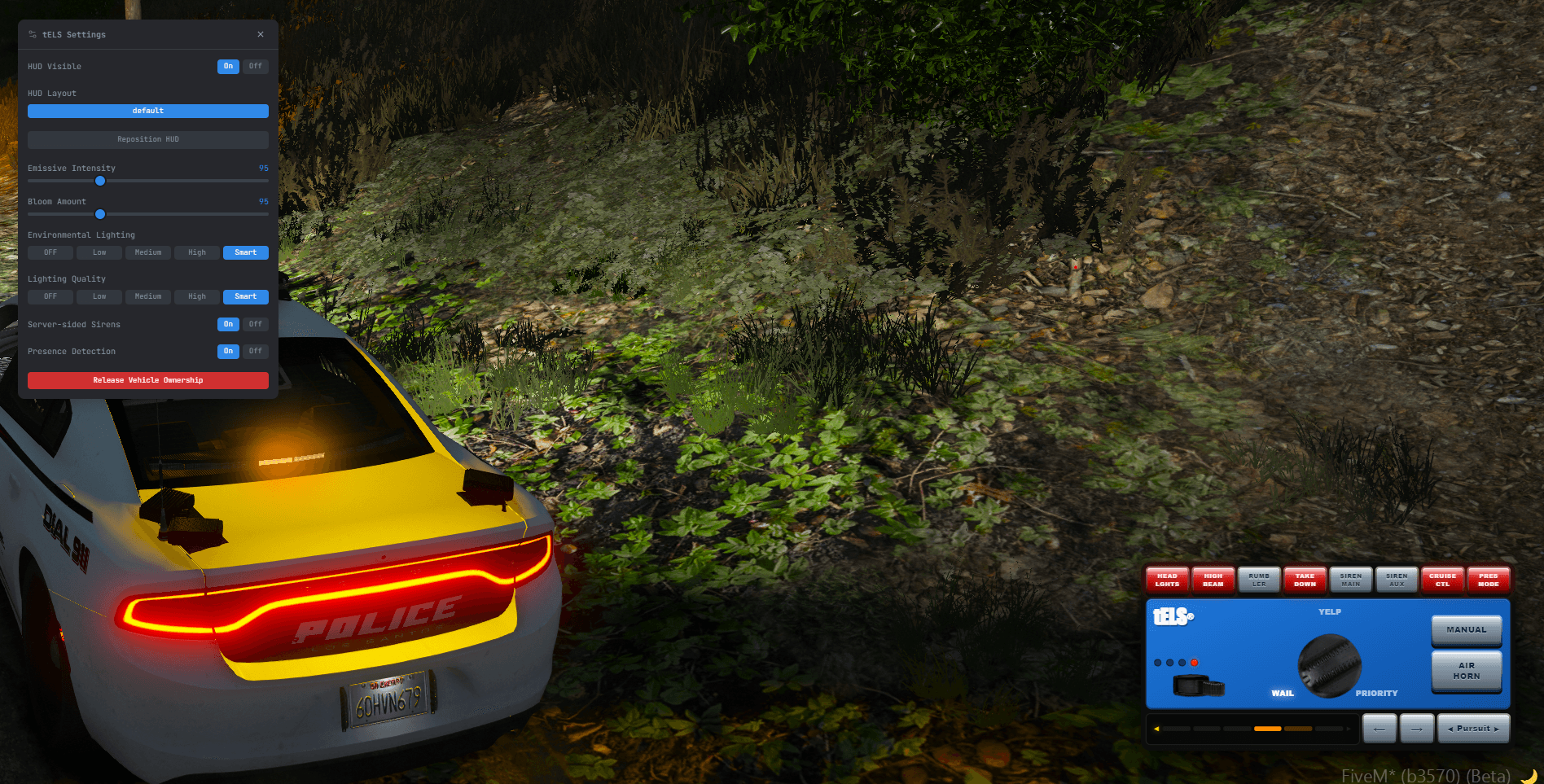
The dialog is built with tLib and applies most changes live as you adjust them.
HUD
| Field | Description |
|---|---|
| HUD Visible | Show or hide the HUD overlay |
| HUD Layout | Pick from any folder under layouts/ |
| Reposition HUD | Enter move mode to drag and scale the HUD; Esc or the NUI confirm saves the new position |
Display
| Field | Description |
|---|---|
| Day/Night Mode | Combined uses one emissive/bloom setting; Day & Night exposes separate values for day and night and switches automatically |
| Emissive (10% – 300%) | LED emissive intensity multiplier |
| Bloom (10% – 300%) | Bloom brightness multiplier |
| Bloom Size | Bloom sprite radius |
| Bloom Skew | Horizontal stretch for bar-style bloom |
In Day & Night mode, each slider has a Day and Night variant.
Quality
| Field | Values | Description |
|---|---|---|
| Environmental Lighting | Off, Low, Medium, High, Smart | Controls how LEDs cast light onto the surrounding world |
| Lighting Quality | Off, Low, Medium, High, Smart | Controls per-LED render pipeline (bloom, coronas, spot lights) |
Smart samples frame time at ~90/75 fps thresholds and downgrades between High and Medium automatically to keep the render cost bounded.
Audio
| Field | Description |
|---|---|
| Server-sided Sirens | Use custom server-bundled siren sounds when a tone has a serverSound configured. Turn off to force vanilla GTA siren audio. |
PA Mic
Shown when you own a tELS vehicle and pma-voice is running.
| Field | Description |
|---|---|
| PA Range (10 – 100 m) | How far your PA voice carries. The server admin sets the default; you can adjust it per-session. pma-voice multiplies this by approximately 3× in native audio mode. |
| PA Preset | Submix effect applied to your PA voice: police (radio bandpass), fire (similar bandpass), or clean (no effect). |
Vehicle (shown when you own a tELS vehicle)
| Field | Description |
|---|---|
| Presence Detection | Enable presence mode. When enabled and the vehicle is locked while you're away, other on-foot players near the vehicle satisfy the presence / presence_mode trigger conditions — used for scene-lighting triggers. |
| Release Vehicle Ownership | Release ownership of the current vehicle so another player can control its lights. |
Admin
| Field | Description |
|---|---|
| Set as Server Defaults | Save the current display (emissive, bloom, env quality, lighting quality, HUD visibility, HUD layout) as the server defaults for all players. |
| Open LED Editor | Launch /telsedit from the dialog. |
Settings persist in KVP under the tels_* prefix; server defaults only apply to fields the player hasn't personally changed.
Stages
Stages are driven entirely by triggers. If a vehicle has no stage_1 / stage_2 / stage_3 conditions in any trigger, Q behaves as a simple on/off toggle. Otherwise Q cycles through each configured stage.
| Stage | Meaning |
|---|---|
| Off | Lights fully deactivated |
| 1–3 | Whatever triggers and pattern overlays are wired to that stage condition |
When lights activate:
- Cruise suspends (and restores on deactivate)
- Takedown suspends if
lightsSuspendTakedownis enabled (siren config, default on) - Traffic Advisor suspends if
lightsSuspendTAis enabled (siren config, default on)
Modes
Cruise (6)
Steady-speed patrol mode. Typical pattern: a single steady rear pattern via a trigger gated on cruise.
Takedown (7)
Forward scene lights. Trigger conditions can force it on when stationary, or off when moving.
Traffic Advisor (8)
Directional arrow patterns. The cycle only includes directions the vehicle has ta_left / ta_right / ta_center triggers for — a vehicle with only a left-arrow pattern will cycle Off ↔ Left.
Presence (/tels → Vehicle)
Presence detection arms the vehicle. While the owner is away and the vehicle is locked, on-foot players who come near satisfy:
presence_mode— true whenever the owner is away and the vehicle is lockedpresence— true when an on-foot player (not another tELS owner) enters the detection radius
Use these to automate scene lighting or amber patterns when an officer leaves the vehicle.
Rumbler (Right Alt)
Toggles the rumbler variant of the main siren when tones have rumbler sounds configured. The aux siren is unaffected.
Horn gestures
The horn key (E) emits three trigger conditions usable from the editor:
| Condition | Fires when |
|---|---|
horn_tap | Press + release in under 400 ms |
horn_double_tap | Two taps within 600 ms of each other |
horn_hold | Held for more than 500 ms |
When hornProgrammable is enabled on the vehicle's siren config, the default airhorn / vehicle-horn sounds are suppressed and your triggers drive the audio exclusively.
Chirp
A chirp is a short siren burst triggered by the park_kill event — when the driver exits the vehicle while sirens are running. It's configured as a trigger action (park_chirp) wired to the park_kill condition, and fires regardless of vehicle speed. Configure the chirp in the Sirens tab:
- Chirp Tone — which tone slot plays
- Play Full Siren (
chirpByCodein the config) — hold the tone for the full chirp duration instead of short blips. Use this when the audio file itself already contains the chirp envelope.
PA Mic
Hold B to broadcast your voice through the vehicle's public address system. Requires pma-voice. The audio passes through a bandpass filter to simulate a real PA speaker.
- Only available when you're in the driver seat, own the vehicle, and are not on a call
- PA Range (10–100 m) and Preset (
police/fire/clean) are adjustable in/tels → PA Mic - A vehicle's siren config can set
paEnabled: falseto disable the PA mic for that specific model - The
tels:paActivestate bag and theIsPaActive()export reflect the current PA state for external scripts
Sirens
Burst
Tapping R (or holding a direct-tone key while lights are off) plays a one-shot siren burst without starting the main siren. Burst mode doesn't change sirenTone so you stay on whatever tone you had selected.
Horn interrupt
When hornInterrupt is enabled (siren config, default on) the main siren pauses while the airhorn plays and resumes on release.
Park kill
When the driver exits and parkKill is enabled (siren config, default on), all sirens stop and the park_kill trigger condition fires. This is what lets a trigger play a short park chirp on driver-exit.