
Configuration
Complete config reference for Tommy's Radio — setup flow, zones, channels, codeplugs, access control, audio, and callbacks.
Config Sources
| Source | Contains | Edited via |
|---|---|---|
config/config.lua | Network, auth, framework, callbacks | Text editor (requires restart) |
data.json | Zones, channels, codeplugs, audio, FX, GPS, emergency, layouts | Web admin panel (live — no restart) |
data.json is managed entirely through the admin panel — changes broadcast to every connected client immediately with no restart needed.
First-Time Setup
After installation, follow this order:
Open the admin panel and create zones and channels
Navigate to http://your-server-ip:port/admin. Go to Zones & Channels and create your zones and channels. See Zones & Channels for field details and channel types.
Create codeplugs
Go to Codeplugs → New. Fill in a name, NAC ID, and allowed models; assign the channel IDs this codeplug can access; save. See Codeplugs for the full creation guide.
Map jobs to codeplugs in sv_functions.lua
Edit config/sv_functions.lua and populate JOB_CODEPLUG_MAP with job name → codeplug ID pairs. See Job → Codeplug Mapping.
Restart the resource
Run restart tRadio in the server console. data.json changes apply instantly; sv_functions.lua and config.lua changes require this restart.
Network & Authentication
Config = {
    serverAddress = "",           -- Public IP or domain. Leave empty to auto-detect.
                                  -- For reverse proxies: "https://radio.yourdomain.com"
    serverPort    = 7777,         -- Port for voice server and dispatch panel
    authToken     = "CHANGE_ME",  -- Shared secret between game server and voice server. Change before going live.
    adminPassword = "CHANGE_ME",  -- Web admin panel password. Change before going live.
    dispatchNacId = "141",        -- Passphrase dispatchers enter on the dispatch panel login screen
}
Change the defaults before going live
authToken and adminPassword must be changed. Leaving them at "CHANGE_ME" exposes your server to unauthorized admin access.
Three settings that control startup behaviour — checkForUpdates, healthCheck, and logLevel — are managed in Admin Panel → Settings → General tab and stored in data.json. They are not in config.lua.
Framework Integration
Config = {
    framework = 'auto',  -- 'auto' | 'esx' | 'qbcore' | 'qbx' | 'nd' | 'ox_core' | 'nat2k15' | 'custom'
}
'auto' cascades at startup: qbx → qbcore → esx → nd → ox_core → nat2k15. Falls back to 'custom' if none is detected. Set 'custom' to skip auto-detection and implement all hooks manually via config/sv_functions.lua.
Inventory Item Requirement
Config = {
    inventory = {
        enabled = false,    -- true = player must carry item to use the radio
        item    = 'radio',  -- item name registered in your inventory resource
        system  = 'auto',   -- 'auto' | 'ox_inventory' | 'qb' | 'esx' | 'custom'
    },
}| Value | Inventory checked | Notes |
|---|---|---|
'auto' | ox_inventory → framework default | Tries ox_inventory first |
'ox_inventory' | ox_inventory | Works standalone or paired with ESX/QB |
'qb' | qb-inventory | qb-core or qbx_core |
'esx' | es_extended | Main ESX inventory only |
'custom' | Your implementation | Override Config.playerHasRadioItem in sv_functions.lua |
When enabled = false (default), only a codeplug assignment is required. Grant tRadio.access ACE to bypass the item check for specific players or groups.
Register the item first
The item must be registered in your inventory resource before enabling. tRadio does not auto-register it. For QB, also register a usable item event if you want players to open the radio by using the item from inventory (see Server Callbacks).
For unsupported inventories (VORP, esx_addoninventory), set system = 'custom' and override Config.playerHasRadioItem:
-- VORP example:
Config.playerHasRadioItem = function(serverId)
    local item = Config.inventory.item or 'radio'
    local p = promise.new()
    exports.vorp_inventory:getItemCount(serverId, item, function(count)
        p:resolve(count)
    end)
    return (Citizen.Await(p) or 0) >= 1
end
Discord Integration
Discord OAuth for the dispatch and admin panels. Create an application at the Discord Developer Portal and add redirect URIs under OAuth2 → Redirects:
http://your-server-ip:port/radio/dispatch/auth
http://your-server-ip:port/admin/auth/callbackConfig = {
discord = {
authEnabled = false, -- Require Discord login for the dispatch panel
clientId = "", -- Discord app client ID
clientSecret = "", -- Discord app client secret
guildId = "", -- Your Discord server ID
roles = "", -- Comma-separated role IDs for dispatch access (empty = any member)
adminRoles = "", -- Comma-separated role IDs for admin panel access (empty = disabled)
redirectUri = "", -- Override OAuth redirect URI (leave empty to auto-detect)
},
}Password and Discord auth can be active simultaneously — the login page shows both options.
Zones & Channels
Zones and channels are managed live in Admin Panel → Zones & Channels and stored in data.json. On first run they are seeded from Config.zones in config.lua. After data.json exists, the admin panel values take precedence — edits to Config.zones in config.lua have no effect.
Finding zone and channel IDs
Channel IDs are shown in small text below each channel name in the admin panel — use these in codeplug channelIds. Zone IDs are auto-assigned on creation (format: name-slug-randomchars, e.g. statewide-ark0v) and are not displayed in the admin panel. Leaving zoneIds empty in a codeplug is the most common setup — it grants access to all zones.
Channel Types
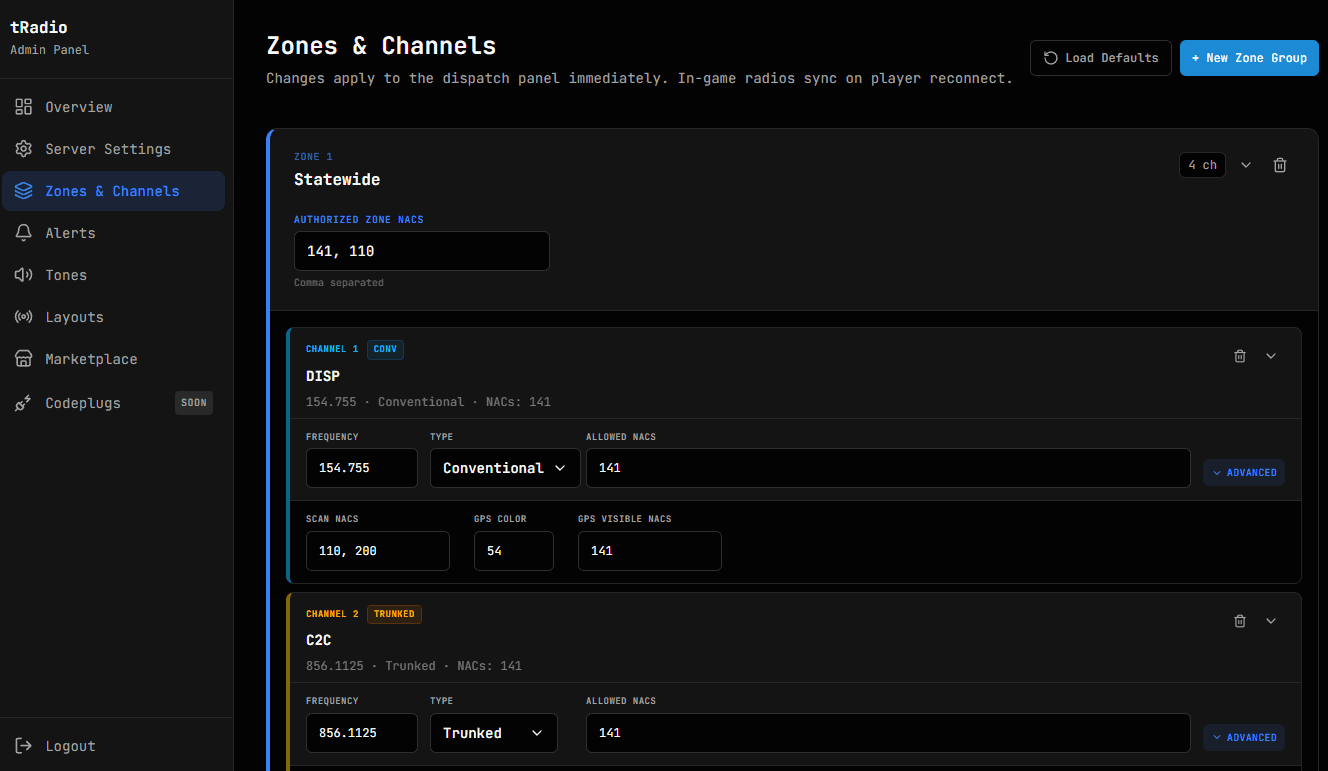
Conventional — single shared frequency. All connected players hear each other regardless of location. Use for most departments and up to ~10 concurrent users per channel.
Trunked — location-based sub-frequency assignment. Units at different locations are placed on separate sub-frequencies automatically, preventing transmission collisions. Dispatchers reach all units via the control frequency. Requires a frequency range (sub-frequency pool) and coverage radius (cell size in meters).
Channel Field Reference
| Field | Type | Description |
|---|---|---|
id | string | Channel ID shown below the channel name in the admin panel — use in codeplug channelIds |
name | string | Display name on the radio |
type | string | "conventional" or "trunked" |
frequency | number | Frequency in MHz (must be unique across all zones) |
frequencyRange | table | Trunked only — { min, max } sub-frequency pool |
coverage | number | Trunked only — cell radius in meters |
allowedNacs | table | NAC IDs shown in dispatch/channel list (display filter — does not gate access) |
scanAllowedNacs | table | NAC IDs that appear in the scan list for this channel |
mode | string | Audio codec: "p25_digital" or "analog" |
gps.color | number | Blip color ID for GPS markers |
gps.visibleToNacs | table | Which NAC IDs can see this channel's GPS blips |
encryption.txMode | string | "Clear" or "Secure" |
canTransmit | bool | false = dispatch monitor-only channel (listen but not transmit) |
Codeplugs
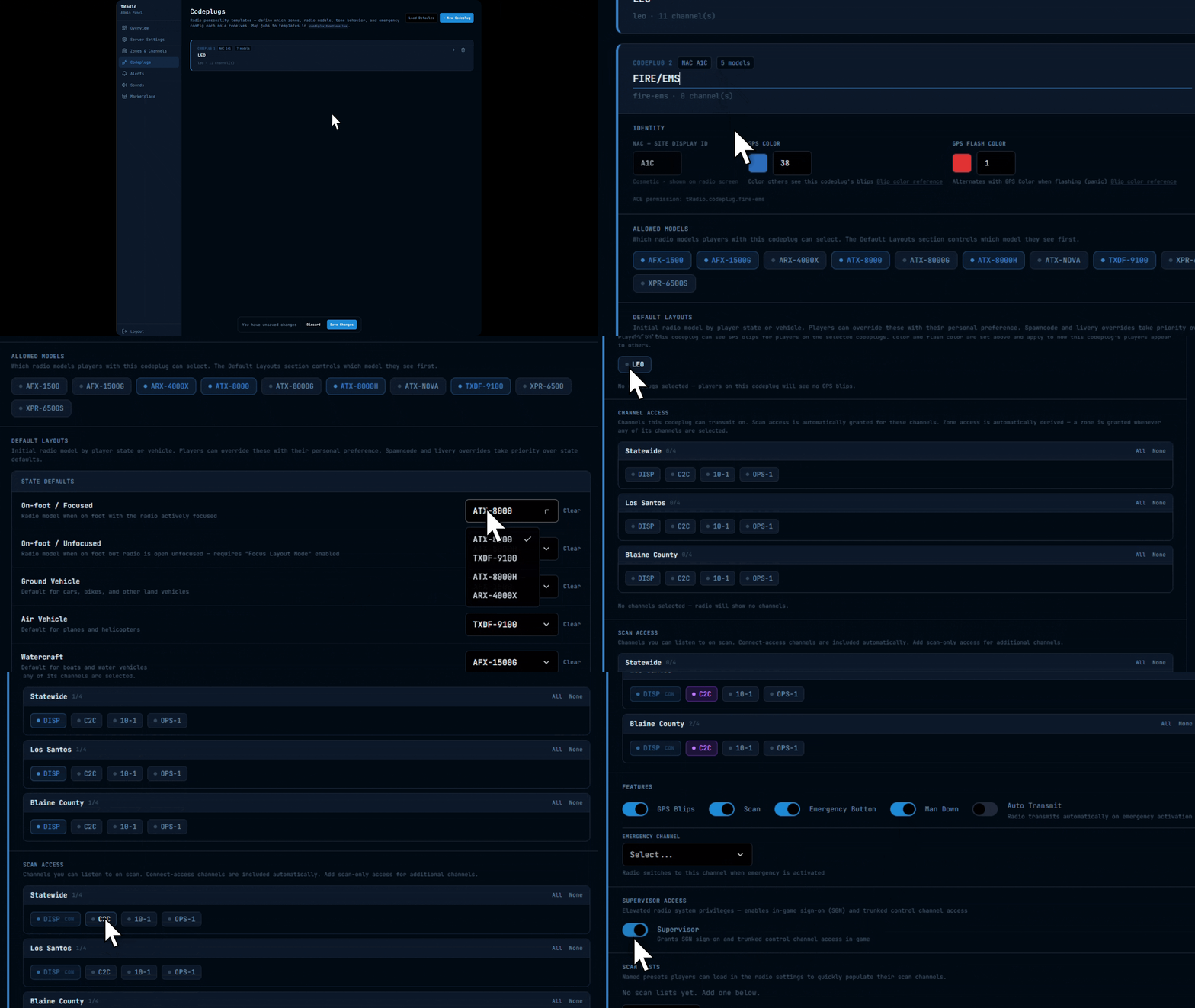
A codeplug is a radio personality template: it defines the player's display NAC ID, zone/channel access, radio model, features (GPS, scan, emergency), and emergency config. Templates are managed live in Admin Panel → Codeplugs — job-to-codeplug mapping is in config/sv_functions.lua.
Creating a Codeplug
Open Admin Panel → Codeplugs → New
Enter a unique ID (used in JOB_CODEPLUG_MAP and ACE permissions), a Name (display label in the panel), and a NAC ID (cosmetic — shown on the radio screen and dispatch panel, does not gate access).
Set allowed models and default layouts
Under Allowed Models, list the radio model folder names this codeplug may use (e.g. ATX-8000, AFX-1500). Under Default Layouts, pick a default model per context: Handheld, HandheldUnfocused, Vehicle, Boat, Air. Default layouts can also be set server-wide in Admin Panel → Layouts — the codeplug value takes precedence for players assigned this codeplug.
Assign channels
Under Channels, add the channel IDs the codeplug can connect and transmit on. Channel IDs are shown in small text below each channel name in Zones & Channels. Optionally add Scan Channels (listen-only, no transmit). Leave Zone IDs empty to grant access to all zones — only populate it to restrict this codeplug to specific zones.
Enable features
Toggle GPS, Scan, Emergency Button, Man-Down, and Auto-Transmit as needed. At minimum, enable GPS and Emergency Button for most public-safety codeplugs.
Save
Click Save. The codeplug is immediately available for assignment. Players already in-game receive the update on their next radio open.
Minimum required fields: id, name, nac, at least one entry in channelIds.
Codeplug Data Structure
The structure below shows all user-configurable fields as they appear in the admin panel. Internal and computed fields (e.g. server-assigned subscriber IDs) are omitted.
{
    id   = "lspd-patrol",
    name = "LSPD Patrol Standard",
    nac  = "141",  -- Display NAC ID on radio/dispatch panel (cosmetic only)

    allowedModels  = { "AFX-1500", "ATX-8000" },
    -- Default layout per context. See Admin Panel → Layouts for server-wide defaults.
    defaultLayouts = {
        Handheld          = "ATX-8000",
        HandheldUnfocused = "ATX-8000",
        Vehicle           = "AFX-1500",
        Boat              = "AFX-1500G",
        Air               = "TXDF-9100",
    },

    -- Channel IDs this codeplug can connect and transmit on.
    -- Channel IDs are shown below each channel name in Admin Panel → Zones & Channels.
    channelIds     = { "sw-disp", "sw-tac1" },
    scanChannelIds = {},   -- listen-only channels (no transmit)

    -- Empty = all zones (most common). Only populate to restrict to specific zones.
    zoneIds = {},

    features = {
        gps             = true,
        scan            = true,
        emergencyButton = true,
        manDown         = false,
        autoTransmit    = true,  -- Auto-transmit on emergency button press
    },

    permissions = {
        supervisor = false,  -- Grants SGN alert button and trunked CT/TK controls
    },

    emergency = {
        emergencyChannelId   = nil,  -- Channel ID to switch to on emergency; nil = stay on current
        autoTransmitDuration = 5,    -- Seconds to auto-transmit (5–120)
    },

    gpsColor      = 54,  -- Blip color for this player's GPS marker
    gpsFlashColor = 1,   -- Blip color during emergency/panic

    scanLists = {},  -- See Scan Lists section below
}
Codeplug Field Reference
| Field | Type | Required | Description |
|---|---|---|---|
id | string | Yes | Unique identifier — used in JOB_CODEPLUG_MAP and ACE permissions |
name | string | Yes | Display name in the admin panel |
nac | string | Yes | Display NAC ID on radio and dispatch panel — cosmetic only, does not gate access |
allowedModels | table | No | Layout folder names the player can select (e.g. { "AFX-1500", "ATX-8000" }) |
defaultLayouts | table | No | Default model per context: Handheld, HandheldUnfocused, Vehicle, Boat, Air. Set server-wide defaults in Admin Panel → Layouts; codeplug values override per-player. |
channelIds | table | Yes | Channel IDs the player can connect and transmit on — primary access path. Use IDs from Admin Panel → Zones & Channels. |
scanChannelIds | table | No | Channel IDs the player can scan (listen only, no transmit) |
zoneIds | table | No | Zone IDs this codeplug can access — empty means all zones |
features.gps | bool | No | Enable GPS blip visibility |
features.scan | bool | No | Enable the scan feature |
features.emergencyButton | bool | No | Show emergency button on radio UI |
features.manDown | bool | No | Enable man-down alarm for this codeplug |
features.autoTransmit | bool | No | Auto-transmit when emergency button is pressed |
permissions.supervisor | bool | No | Grants SGN alert button and trunked CT/TK controls in-game |
emergency.emergencyChannelId | string|nil | No | Channel ID to switch to on emergency; nil = stay on current |
emergency.autoTransmitDuration | number | No | Seconds to auto-transmit on emergency activation (5–120) |
gpsColor | number | No | Blip color ID for this player's GPS marker |
gpsFlashColor | number | No | Blip color during emergency/panic |
scanLists | table | No | Named scan list presets — see Scan Lists |
Scan Lists
Named channel groups for the scan feature. features.scan must be true. Configured in Admin Panel → Codeplugs.
scanLists = {
    {
        id      = "scan-statewide",
        name    = "Statewide",
        entries = {
            { channelId = "ch-dispatch", priority = 1 },  -- 1=High 2=Normal 3=Low
            { channelId = "ch-tac1",     priority = 2 },
        },
    },
}
Unit IDs
Each subscriber receives a unique P25 unit ID derived from their codeplug ID and license hash — consistent across sessions for the same player on the same codeplug.
local info = exports['tRadio']:getSubscriberInfo(serverId)
print(info.unitId)
Job → Codeplug Mapping
Map player jobs to codeplug IDs in config/sv_functions.lua. Keys must match the id field of a codeplug in the admin panel. Changes require restart tRadio.
local JOB_CODEPLUG_MAP = {
    ['police']    = 'lspd-patrol',
    ['ambulance'] = 'safd-engine',
    ['fire']      = 'lafd-engine',
}

Config.getPlayerCodeplugId = function(serverId)
    local Player = exports['qb-core']:GetPlayer(serverId)
    if not Player then return nil end
    return JOB_CODEPLUG_MAP[Player.PlayerData.job.name]
endlocal JOB_CODEPLUG_MAP = {
['police'] = 'lspd-patrol',
['ambulance'] = 'safd-engine',
['fire'] = 'lafd-engine',
}
Config.getPlayerCodeplugId = function(serverId)
local xPlayer = ESX.GetPlayerFromId(serverId)
if not xPlayer then return nil end
return JOB_CODEPLUG_MAP[xPlayer.getJob().name]
endlocal JOB_CODEPLUG_MAP = {
['police'] = 'lspd-patrol',
['ambulance'] = 'safd-engine',
['fire'] = 'lafd-engine',
}
-- Substitute your framework's job lookup
Config.getPlayerCodeplugId = function(serverId)
local job = -- your framework job lookup
return JOB_CODEPLUG_MAP[job]
endnat2k15: use dept level keys, not job names
nat2k15 exposes player data via exports['framework']:geteverything(). Use p.level keys (e.g., 'lspd_level', 'bcso_level') as keys in JOB_CODEPLUG_MAP instead of job name strings.
As an alternative to JOB_CODEPLUG_MAP, grant tRadio.codeplug.{id} ACE in server.cfg — both paths are equivalent. See ACE Permissions. Players without a matching entry have no radio access.
Access Control
Access Resolution Order
tRadio resolves access in seven steps on every radio open attempt and on every refreshNacId call. A player gets the union of codeplug-based and ACE-based access.
| Step | Gate | Deny condition |
|---|---|---|
| 1 | Radio access — Config.getPlayerAccess(serverId) | Returns false → no radio at all |
| 2 | Codeplug required — JOB_CODEPLUG_MAP, Config.getPlayerCodeplugId, or tRadio.codeplug.{id} ACE | No codeplug assigned → no radio |
| 3 | Zone visibility — codeplug zoneIds or tRadio.zone.{N} ACE | Empty zoneIds = all zones visible |
| 4 | Channel access — codeplug channelIds, zone membership (step 3), or tRadio.connect.{freq} ACE | None of the above → channel hidden |
| 5 | Scan — codeplug scanChannelIds, connect access (step 4), or tRadio.scan.{freq} ACE | None of the above → no scan |
| 6 | GPS visibility — codeplug visibleCodeplugs or tRadio.gps.{freq} ACE | None of the above → no GPS blips |
| 7 | Admin controls — SGN + trunked CT/TK | Requires tlib.admin ACE or permissions.supervisor = true |
Call exports['tRadio']:refreshNacId(serverId) after any permission change — access is re-resolved and pushed to the client. Players on a newly inaccessible channel are auto-disconnected. See Refreshing NAC IDs on Job Change for framework-specific event handlers.
ACE Permissions
Radio Access & Codeplug
| ACE | Grants |
|---|---|
tRadio.access | Bypass inventory item requirement — player can open the radio without carrying the item |
tRadio.codeplug.{id} | Directly assign codeplug {id} — equivalent to a JOB_CODEPLUG_MAP entry |
add_ace group.admin tRadio.access allow
add_ace identifier.steam:110000100000001 tRadio.codeplug.lspd-patrol allow
Per-Frequency Permissions
Encode the frequency by removing the decimal point: 154.815 → 154815, 856.1125 → 8561125.
| ACE | Grants |
|---|---|
tRadio.connect.{freq} | Transmit on a frequency |
tRadio.scan.{freq} | Scan (listen only) on a frequency |
tRadio.gps.{freq} | See GPS blips for a frequency |
tRadio.zone.{N} | Access zone N (1-based index) |
add_ace group.ems tRadio.connect.154755 allow
add_ace group.ems tRadio.scan.8561125 allow
add_ace group.ems tRadio.gps.154755 allow
add_ace group.ems tRadio.zone.1 allow
Admin Radio Controls
add_ace group.admin tlib.admin allowtlib.admin grants the in-game SGN alert button and trunked CT/TK toggle. Also grantable per-codeplug via permissions.supervisor = true. Neither grants web admin panel access, which uses adminPassword / Discord auth.
NAC IDs
NAC IDs are display identifiers shown on the radio screen and dispatch panel. They come from the codeplug's nac field and can be overridden at runtime:
exports['tRadio']:setUserNacId(serverId, '142')NAC IDs do not control zone or channel access. dispatchNacId in config.lua is a separate concept — it is the passphrase dispatchers enter on the dispatch panel login screen.
Server Callbacks
Edit in config/sv_functions.lua. These run server-side on every radio open attempt and on permission refresh.
-- Master gate: return false to deny radio access entirely.
-- Codeplug check runs independently — both must pass when inventory is enabled.
Config.getPlayerAccess = function(serverId)
    return true  -- default allows all; codeplug check still runs
end

-- Item check: called when Config.inventory.enabled = true.
-- Override when Config.inventory.system = 'custom'.
Config.playerHasRadioItem = function(serverId)
    -- default: handled automatically for ox_inventory / qb / esx
end

-- Codeplug assignment: return a codeplug ID string, or nil to deny.
-- See Job → Codeplug Mapping for framework-specific examples.
Config.getPlayerCodeplugId = function(serverId)
    return nil  -- replace with: return JOB_CODEPLUG_MAP[getPlayerJob(serverId)]
end

-- Display name shown on the radio and dispatch panel.
Config.getPlayerName = function(serverId)
    return GetPlayerName(serverId)
end
Custom Framework Implementations
For multi-character frameworks or non-standard job structures, set Config.framework = 'custom' and override hooks directly.
Config.getPlayerAccess = function(serverId)
    local Player = exports['qb-core']:GetPlayer(serverId)
    if not Player then return false end
    local radioItem = Player.Functions.GetItemByName("radio")
    return radioItem and radioItem.amount > 0 or false
end

Config.getPlayerName = function(serverId)
    local player = exports['qb-core']:GetPlayer(serverId)
    if player and player.PlayerData then
        if player.PlayerData.metadata.callsign then
            return player.PlayerData.metadata.callsign
        end
        if player.PlayerData.charinfo.lastname then
            return player.PlayerData.charinfo.lastname
        end
    end
    return GetPlayerName(serverId)
end

exports['qb-core']:CreateUseableItem('radio', function(source)
    TriggerClientEvent('radio:use', source)
end)RegisterNetEvent('radio:use', function()
exports['tRadio']:openRadio()
end)ESX = exports['es_extended']:getSharedObject()
Config.getPlayerAccess = function(serverId)
local xPlayer = ESX.GetPlayerFromId(serverId)
if not xPlayer then return false end
local radioItem = xPlayer.getInventoryItem('radio')
return radioItem and radioItem.count > 0 or false
end
Config.getPlayerName = function(serverId)
if not serverId or serverId <= 0 then return "DISPATCH" end
local xPlayer = ESX.GetPlayerFromId(serverId)
if not xPlayer then return GetPlayerName(serverId) end
local callsign = xPlayer.getMeta("callsign")
if callsign and callsign ~= "" then return callsign end
local name = xPlayer.getName()
if name and name ~= "" then
return string.match(name, "%s+(%S+)$") or name
end
return GetPlayerName(serverId)
end
ESX.RegisterUsableItem('radio', function(playerId)
TriggerClientEvent('radio:use', playerId)
end)RegisterNetEvent('radio:use', function()
exports['tRadio']:openRadio()
end)For Qbox, ND_Core, ox_core, and nat2k15, the pattern is identical — substitute the appropriate framework API. See the built-in implementations in config/sv_functions.lua for working starting points.
Refreshing NAC IDs on Job Change
Call exports['tRadio']:refreshNacId(source) when a player's job changes so their channel access updates immediately without a reconnect. This is where the access resolution order (steps 1–7 above) is re-evaluated and pushed to the client.
RegisterNetEvent('QBCore:Server:OnJobUpdate', function(source)
    exports['tRadio']:refreshNacId(source)
end)AddEventHandler('esx:setJob', function(source)
exports['tRadio']:refreshNacId(source)
end)RegisterNetEvent('QBCore:Server:OnJobUpdate', function(source)
exports['tRadio']:refreshNacId(source)
end)AddEventHandler('ND:SetJob', function(source)
exports['tRadio']:refreshNacId(source)
end)AddEventHandler('ox_core:setGroup', function(source, groupName, grade)
exports['tRadio']:refreshNacId(source)
end)-- nat2k15 has no built-in job-change event; refresh on connect instead
AddEventHandler('playerConnecting', function()
local src = source
SetTimeout(2000, function() exports['tRadio']:refreshNacId(src) end)
end)Client Callbacks
Edit in config/cl_functions.lua.
canTalk
Runs before each PTT transmission. Return false to block.
Config.canTalk = function()
    if IsPlayerDead(PlayerId()) then return false end
    if IsPedSwimming(PlayerPedId()) then return false end
    return true
end
batteryTick
Controls battery drain and charge rates. Called every frame while the radio is on. deltaTime is in seconds (fractional, ~0.016 at 60 fps) — multiply rates by deltaTime for frame-independent values.
Config.batteryTick = function(currentBattery, deltaTime)
    local vehicle = GetVehiclePedIsIn(PlayerPedId(), false)
    if vehicle ~= 0 then
        return math.min(100.0, currentBattery + (0.5 * deltaTime))  -- charge in vehicle
    else
        return math.max(0.0, currentBattery - (0.1 * deltaTime))    -- drain on foot
    end
end
bgModeCheck
Polled every ~500ms. Returns a mode string (or false/nil) that determines which background sound plays behind the voice during a transmission — other players on the channel hear it looping.
| Return | Sound played |
|---|---|
false / nil | None |
"siren" | bgSiren.wav |
"helicopter" | bgHeli.wav |
"k9" | bgDog.wav |
| any string | WAV mapped in Admin Panel → Background Sound Modes |
The default bgModeCheck cascades through providers: helicopter → K9 → tELS → LVC → ELS-FiveM → JLS → ALS → native GTA siren. Which providers are checked is controlled by Config.sirenSystem.
sirenSystem
Config.sirenSystem = 'auto'  -- 'auto' | 'tels' | 'lvc' | 'lvc_fleet' | 'els_fivem' | 'jls' | 'als' | 'native' | 'custom'

Config.sirenResources = {
    tels = 'tELS',
    lvc  = 'lvc',        -- also covers lvc_fleet (shared event system)
    jls  = 'Jace3483_JLS',
    -- els_fivem and als use client events — no entry needed
}
Set 'custom' to skip all provider checks and implement detection directly inside bgModeCheck. Edit sirenResources only if your ELS resource uses a non-standard name.
Playing different WAVs per siren tone (LVC example):
if tone == 2 then return "sirenWail" end
if tone == 3 then return "sirenYelp" end
if tone > 0  then return "siren"     end
-- Map "sirenWail" and "sirenYelp" to WAV files in Admin Panel → Background Sound Modes
Forcing an immediate re-poll after a siren state change:
exports['tRadio']:NotifySirenChanged()Admin Panel Settings
All settings in this section live in data.json and are managed through Admin Panel → Server Settings. Changes apply instantly to all connected clients — no restart needed. The Settings page has four tabs: General, Audio & Radio, Controls, and Advanced.
General Tab
| Setting | Default | Description |
|---|---|---|
checkForUpdates | true | Check for updates on resource start |
healthCheck | true | Run port reachability probe at startup |
logLevel | 3 | Console verbosity: 0=Error 1=Warn 2=Minimal 3=Normal 4=Detailed 5=Verbose |
blipsEnabled | true | Master switch for all GPS blips |
gpsBlipUpdateRate | 50 | GPS blip update interval (ms). Lower = smoother, higher CPU |
signalDegradationEnabled | false | Audio quality degrades with distance from signal towers |
signalDegradationIntensity | 50 | Max degradation severity at lowest signal (0–100) |
signalFalloffRate | 24 | Slope of signal drop-off — higher = faster drop |
useCallsignSystem | true | Enable the built-in callsign system |
callsignCommand | "callsign" | Chat command to set callsign |
Signal tower coordinates are configured in Admin Panel → Settings → Signal Towers — no file editing required.
Callsigns persist client-side in tLib KVP, namespaced by tlib_community_id (falls back to sv_projectName). Two servers sharing the same community ID share callsigns.
Audio & Radio Tab
Volume scales
Admin panel volumes use 0–100. The Lua export API and REST API use 0.0–1.0. Divide by 100 when passing config values to exports (e.g., voiceVolume = 65 → exports['tRadio']:setVolume(0.65)).
| Setting | Default | Description |
|---|---|---|
voiceVolume | 65 | Default voice volume (0–100) |
sfxVolume | 35 | Default SFX/tone volume (0–100) |
volumeStep | 5 | Volume adjustment increment per keypress |
pttReleaseDelay | 350 | Ms to keep transmitting after releasing PTT |
pttTriggersProximity | true | PTT also triggers proximity voice |
playTransmissionEffects | true | Enable background SFX during PTT |
analogTransmissionEffects | true | Route background SFX through the analog FX chain |
enable3DAudio | false | Master switch for 3D audio |
default3DAudio | false | Initial per-player default (false = new players join with earbuds on) |
default3DVolume | 50 | Default 3D audio volume for new players (0–100) |
vehicleRadio3DAudioEnabled | false | Radio also plays from the player's vehicle after they walk away |
vehicle3DActivationDistance | 3 | Meters from vehicle before it takes over as the 3D source |
Radio FX
Two independent audio processors. Both can be enabled simultaneously — analog chain is applied on top of vocoder output.
Analog FX chain (fxEnabled) — classic radio sound:
mic → inputGain → highpass → lowpass → compressor → limiter → tube saturation → mid EQ → outputP25 IMBE vocoder (p25Enabled) — real P25 Phase 1 codec. Every listener (in-game, dispatch, 3D bystanders) hears authentic P25 sound. First PTT of a session has a brief cold-start warm-up.
| Setting | Default | What it does |
|---|---|---|
radioFx.fxEnabled | true | Master switch for the analog chain |
radioFx.p25Enabled | false | Master switch for the IMBE vocoder |
radioFx.inputGain | 1.65 | Pre-chain gain |
radioFx.highpassFrequency | 250 | Rolls off bass below this Hz |
radioFx.lowpassFrequency | 3500 | Rolls off treble above this Hz |
radioFx.compression | 60 | Dynamic range compression (0–100) |
radioFx.distortion | 30 | Tube-saturation drive |
radioFx.distortionMode | "classic" | "classic" = hard-clip; "tube" = smooth saturation |
radioFx.midBoost | 2 | Mid-frequency EQ boost (dB) |
| Problem | Fix |
|---|---|
| Too muffled / telephone-like | Raise lowpassFrequency (4000–5000) |
| Too tinny / harsh | Lower highpassFrequency (150–200) |
| Volume pumping | Lower compression |
| Crackling / distorted | Lower inputGain (0.8–1.2) or distortion |
3D Audio
A player broadcasts in 3D while: enable3DAudio = true, their Earbuds toggle is off, and they are transmitting, receiving, or playing a tone. Range: 100 m (person) or 200 m (vehicle source). With vehicleRadio3DAudioEnabled on, entering a vehicle claims it as a 3D source; walking more than vehicle3DActivationDistance m away hands the source role to the vehicle.
Controls Tab
| Setting | Default | Description |
|---|---|---|
bonking.blockTransmission | true | Suppress the second PTT when someone is already transmitting (enforced server-side) |
bonking.playBonkTone | true | Play a bonk tone to the blocked user |
bonking.bonkToneGlobal | true | Also play the bonk tone to everyone on the channel |
bonking.doubleTapOverride | true | Double-tapping PTT within doubleTapWindow bypasses the block |
bonking.doubleTapWindow | 1500 | Double-tap window (ms) |
Default keybinds are also configured on this tab and stored in data.json. Players can rebind any key in FiveM → Settings → Key Bindings → FiveM.
Advanced Tab
| Setting | Default | Description |
|---|---|---|
panicTimeout | 60000 | Ms before panic auto-clears |
defaultManDownEnabled | false | Enable man-down alarm for new players by default |
manDownWarningDelay | 10000 | Ms before warning tone plays after player goes incapacitated |
manDownEmergencyDelay | 30000 | Ms after warning before full emergency alarm triggers |
defaultTtsEnabled | true | Enable voice announcements (TTS) for new players by default |
animationsEnabled | true | Allow PTT/focus animations |
focusLayoutMode | false | Default state of the on-foot focus/unfocus split layout toggle |
Earbud Clothing Detection
Automatically enables earbuds mode when a player wears specific clothing items. Configured in the admin panel — no restart required.
| Field | Type | Description |
|---|---|---|
slotId | number | GTA V component/prop slot ID |
slotType | string | "prop" for accessories, "component" for clothing |
drawableId | number | The drawable index to match |
Checked every 7 seconds. Manual earbud toggles are respected until clothing state changes again.